A shaky wedding clip can ruin a moment that will never happen twice. That is why the Osmo Mobile 7 has caught attention among couples, content creators, and weekend shooters who want smoother phone footage without carrying a full camera rig. At the time of checking, DJI’s U.S. store listed the standard unit at $75 and marked it out of stock, while the higher 7P option was also shown as out of stock. That matters because wedding videography is no longer only for paid crews with heavy gear. A bridesmaid, a cousin, or a planner can now film vows, entrances, and dance-floor reactions with a phone and a small stabilizer. For readers tracking gear demand through consumer product trend reporting, this is the kind of product surge that makes sense: low entry cost, clear use case, and instant social proof. The deeper question is not whether a phone gimbal is popular. It is why this one feels useful at the exact moment casual wedding video is becoming part of the event itself.
Why the Osmo Mobile 7 Hit a Nerve With Wedding Shooters
Wedding video has changed because the people filming it have changed. A decade ago, the main footage came from a hired team, and everyone else took loose phone clips from their seats. Now the couple still may hire pros, but the best small moments often come from guests. A flower girl fixing her shoes. A dad practicing his speech in the hallway. The groom exhaling before the doors open.
The rise of phone-first wedding coverage
The modern wedding is built for small clips. Reels, TikToks, Stories, private family albums, and same-day highlight edits all reward footage that feels close and alive. A smartphone gimbal fits that habit because it lets you move without making the video look like a panic run through a hotel lobby.
That is the non-obvious part. A gimbal is not only about smoothness. It gives the person filming more confidence, so they stand in better places, move slower, and frame with more care. Gear changes behavior.
Take a U.S. backyard wedding in Austin or a small reception in New Jersey. The person holding a phone may not know camera terms, but they know the clip looks better when the aisle walk stays level. A compact stabilizer turns a nervous guest into a steadier witness.
Why a viral post can move real inventory
A viral wedding post works because it shows a problem and a fix in the same breath. The viewer sees shaky footage, then sees a smooth version, then thinks, “I could do that.” That reaction sells better than a spec sheet.
The price also matters. A phone gimbal at this range sits in impulse-gift territory for many U.S. buyers. It can be bought by a couple before the wedding, by a content creator who films events on weekends, or by a family member who wants better clips without renting gear.
The catch is demand can look bigger than it is when social media lights up. Some people buy after one post and never learn the controls. The smarter buyer pauses for a minute and asks whether the device fits the type of filming they will do.
What Buyers Should Know Before Chasing the Restock
The rush is easy to understand, but a gimbal is still a tool. It rewards patience more than hype. If you buy one for wedding videography, you are buying steadier movement, better framing habits, and a safer way to film with a phone in crowded spaces.
Specs that matter during a long event
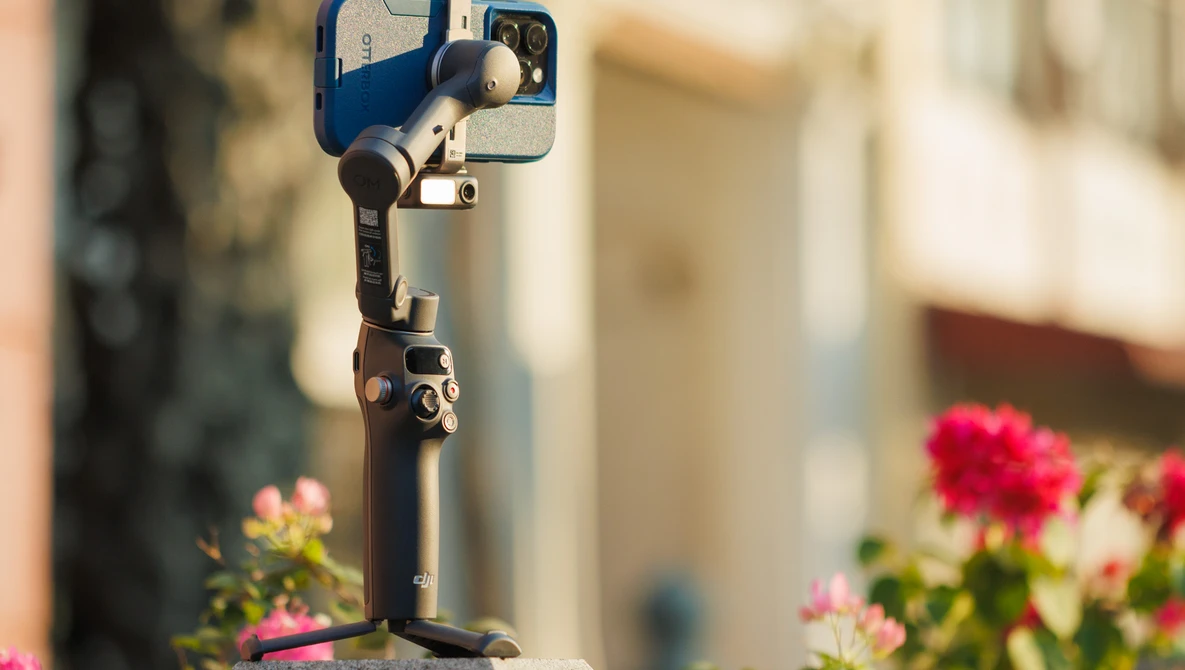
DJI lists the standard model at about 300 grams with the built-in tripod and magnetic phone clamp, which is light enough for longer handheld use. The company also lists phone compatibility at 170 to 300 grams, 6.9 to 10 mm thick, and 67 to 84 mm wide, which is worth checking before purchase.
Battery life sounds simple until you are at a reception. DJI rates the unit for about 10 hours in a controlled setup, but the company notes that tracking, fill light use, and phone charging can cut operating time. A wedding day is not controlled. It is hot, loud, crowded, and full of sudden movement.
That means the best use is not to keep the gimbal running from makeup to send-off. Use it for moments that deserve movement: aisle shots, couple entrances, first dance, cake cutting, and short guest reactions. Save casual table clips for handheld phone shots.
The wedding problem no spec sheet solves
A stabilizer can smooth your hand, but it cannot fix poor timing. The most common beginner mistake is chasing everything. You swing from the bride to the crowd, then to the flowers, then back to the groom, and the clip feels busy.
The better move is restraint. Pick one subject and let the moment breathe. During a first dance, that may mean staying wide for ten seconds before moving closer. During vows, it may mean filming hands instead of faces if you are not near the aisle.
This is where smartphone creator setup ideas can help more than another accessory list. Good mobile footage comes from a small system: charged phone, clean lens, enough storage, a stable grip, and a plan for when to film.
How It Compares With Bigger Wedding Gear
A phone gimbal is not a replacement for a pro wedding camera. It is a different kind of tool. It gives casual shooters access to motion shots that used to need more practice, but it still depends on phone sensor size, lighting, audio, and the person holding it.
Where a smartphone gimbal wins
The biggest win is speed. You can pull it from a bag, mount the phone, and start filming without drawing much attention. DJI describes the 7-series line as lightweight and portable, with three-axis stabilization and ActiveTrack technology for subject tracking.
At a wedding, low attention is worth more than people admit. A large camera can change how guests act. A phone on a compact stabilizer feels familiar, so people stay natural. That is often where the best footage lives.
Another win is angle variety. The built-in tripod can handle a table shot on a level indoor surface, while the gimbal handle makes walking shots cleaner. For a bridal prep room, that can mean one slow move across shoes, rings, dress fabric, and handwritten vows.
Where it still falls short
Low light is the first limit. A phone can look good in a bright ceremony space, then struggle in a dim reception hall with colored uplighting. Stabilization does not add light. It only controls motion.
Audio is another limit. A phone across the room will not record vows like a lav mic on the groom or a feed from the DJ board. For social clips, that may be fine. For a keepsake film, it is not enough.
The counterintuitive truth is that a gimbal can make bad footage look more intentional. That sounds helpful, but it can hide mistakes until later. Smooth footage with poor exposure, bad focus, or weak story still feels empty.
How to Buy Without Getting Pulled Into Hype
When a small creator tool sells out, buyers often rush toward any listing they can find. That is where mistakes happen. A wedding deadline makes people impatient, and impatience can turn a simple purchase into a bad one.
Check the version, bundle, and phone fit
Start with the exact bundle. The standard unit and higher bundle do not include the same extras. DJI’s store page shows different options, with the higher model and certain creator bundles priced above the standard version.
Then check phone fit. A thick case can push your phone beyond the supported thickness range. A large phone with a heavy case and lens add-on may sit near the upper weight limit. That does not mean it will fail, but it may affect handling.
For wedding use, I would pick fit over features. A gimbal that holds your phone cleanly is better than a fancier kit that feels awkward after 20 minutes. Comfort decides whether you use it when the big moment arrives.
Avoid overpaying for panic stock
Out-of-stock pages create pressure. The page says “Notify Me,” a reseller says “few left,” and suddenly a $75 item looks like a must-buy at a markup. Slow down.
Look at the date of the wedding, the return policy, shipping speed, and whether the seller is trusted. Also think about borrowing. Many creators buy gimbals, use them twice, then let them sit in a drawer. A local rental, a friend, or a used unit can make sense for one event.
For a couple planning content, wedding filming gear guide should start with roles, not gadgets. Decide who films ceremony clips, who captures reactions, who handles backup storage, and who stays out of the hired videographer’s way. The gear matters more after that plan exists.
Conclusion
The sellout story makes sense because this type of tool lands at the crossing point of weddings, phones, and short-form video. People want footage that feels polished, but they do not want to carry a camera bag through a reception. They want a clean clip of the aisle walk, the first dance, and the loud table of cousins who never sit still.
For buyers who understand its limits, the Osmo Mobile 7 is less about chasing a viral post and more about reducing the small mistakes that ruin once-only footage. It will not replace a skilled wedding filmmaker, and it will not save poor lighting or distant audio. But in the hands of a patient guest or creator, it can make phone video feel calmer, cleaner, and easier to watch.
Wait for fair stock, check your phone fit, practice before the event, and film fewer moments with more care. The best wedding clip is not the smoothest one. It is the one that still feels alive years later.
Frequently Asked Questions
Is a phone gimbal worth it for wedding videography?
Yes, if you plan to film movement-heavy moments such as aisle walks, entrances, dances, and guest reactions. It helps reduce shake and makes phone footage easier to watch. It is less useful if you only plan to record seated clips from one position.
Can a smartphone gimbal replace a wedding videographer?
No. It can improve guest-shot clips, but it does not replace professional planning, audio capture, lighting control, lens choice, or editing skill. Think of it as a support tool for extra moments, not the main wedding film solution.
What phone should I use with a wedding gimbal?
Use a phone with strong video stabilization, good low-light performance, enough storage, and reliable battery life. Before buying a stabilizer, check the supported phone width, thickness, and weight against your phone plus case.
How should beginners film better wedding clips with a gimbal?
Move slower than feels natural, hold shots longer, and avoid swinging between subjects. Clean the phone lens, lock exposure when needed, and practice walking shots before the wedding day. Short, steady clips often beat long wandering footage.
Is the built-in tripod useful at a wedding?
Yes, but only in the right setting. It works best on stable indoor surfaces for speeches, detail shots, or prep-room clips. Avoid using a small tripod in windy outdoor areas, crowded dance floors, or places where someone may bump it.
What moments should I film first at a wedding?
Focus on moments with emotion and movement: ceremony entrance, vows from a respectful distance, couple exit, first dance, parent dances, cake cutting, and candid guest reactions. Skip filming everything. A smaller set of strong clips is easier to edit.
Should I buy from a reseller during a sellout?
Only buy from a trusted seller with clear returns, real warranty terms, and fair pricing. Avoid panic markups unless the event date leaves no other choice. Check official stock alerts first, then compare known retailers before paying extra.
What accessories help most with mobile wedding video?
A small power bank, phone storage plan, microfiber lens cloth, compact light for prep shots, and a simple audio solution can help more than extra mounts. Practice matters most. The best accessory is knowing when to start and stop recording.

Related Posts