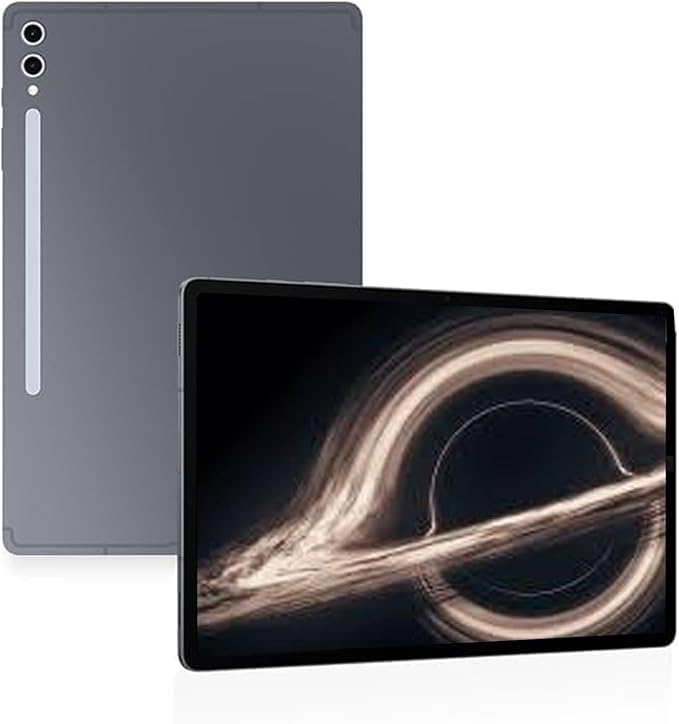
A tablet deal is easy to hype and hard to judge. The Galaxy Tab S10 Ultra is different because the sale lands on a device that already sits in a strange spot: too big for casual sofa scrolling, yet strong enough to replace a laptop for certain people. For U.S. shoppers watching premium Android gear, the recent Samsung tablet deal reported at $849.99 for the 256GB Wi-Fi model after a $350 cut from $1,199.99 puts the value question in sharper focus.
That does not mean every buyer should rush. A 14.6-inch slate asks more from your desk, bag, and budget than a normal tablet. It rewards students, artists, remote workers, and media-heavy households who want a wide canvas with an included pen. It disappoints people who mainly check email in bed. For deal watchers who compare tech drops through trusted product deal coverage, the smarter move is not asking whether the price is low. It is asking whether the size, software, and timing match how you live.
Why the Galaxy Tab S10 Ultra Sale Feels Different This Time
A discount on an older premium tablet can mean two things. Sometimes it is a clearance bin wearing a nice suit. Other times it is the point where the original price finally stops getting in the way of the product’s best use case. This sale leans toward the second camp, but only for buyers who already wanted a wide-screen Android tablet sale rather than a smaller iPad, Chromebook, or laptop. The headline price gets attention, but the better story is how the lower cost changes the type of buyer who can defend the purchase.
A high-end tablet finally meets a saner price
The original retail price made the device feel like a luxury purchase for most U.S. households. Once a tablet crosses the thousand-dollar line, buyers stop comparing it to other tablets and start comparing it to laptops. That is where the tension begins. A laptop has a keyboard built in, a wider desktop app base, and less need for add-ons. A tablet wins only when touch, pen input, thinness, and instant media use matter more.
At a lower sale price, the math changes. The included S Pen matters here because many rivals push you into buying a stylus after checkout. Samsung also lists a 14.6-inch Dynamic AMOLED 2X screen for the Ultra model, with the display measured as 14.6 inches in the full rectangle and 14.5 inches with rounded corners. That turns the device into something closer to a digital desk than a couch companion. It also explains why the deal feels different from a discount on a smaller tablet: you are not paying for another window into apps, you are paying for space.
A non-obvious point: the discount may matter more to people who will not use it every hour. If you are an architecture student marking PDFs three nights a week, a creator sketching thumbnails on weekends, or a parent using it as the household screen for recipes and streaming, the lower entry price softens the guilt of buying a device built for bursts of heavy use. It does not need to replace every screen in your life to be worth owning.
The sale is less about speed and more about fit
Most deal pages frame premium tablets around processor power. That is easy. It is also not where many owners feel the difference day to day. The real test is whether the tablet fits your pattern. Do you split-screen a browser and notes? Do you annotate files? Do you watch games while checking fantasy lineups? Do you travel enough to want one thin screen instead of a laptop and an entertainment tablet?
The S10 Ultra makes the most sense when those habits overlap. A graduate student in Chicago could keep lecture slides on one side and handwritten notes on the other. A small business owner in Austin could review product photos, answer messages, and run a video call from the same device before a client meeting. In those moments, the large screen tablet stops feeling oversized and starts feeling calm.
The trap is buying it because the price fell. A Samsung tablet deal can still be a bad buy if it solves a problem you do not have. This model is not trying to be the tablet everyone carries around the house. It is trying to be the tablet that gives you room when a normal slab feels cramped. That difference sounds small until you live with it for a week.
What Buyers Should Know Before Chasing the Lowest Price
The lowest sticker rarely tells the full story. Storage size, condition, seller, return window, keyboard cost, and trade-in rules can turn a deal into a headache. That is why this product needs a more careful read than a cheap streaming tablet. You are not buying a spare screen. You are buying a work surface. A few minutes of checking can protect you from a listing that looks great in search results but feels weaker once shipping, accessories, and warranty details appear.
Check the exact configuration before checkout
Retail pages often mix storage sizes, colors, new units, open-box models, and marketplace listings in a way that makes the best price look simpler than it is. Best Buy’s listing identifies the 256GB Wi-Fi model with S Pen and shows strong customer interest, including a 4.8 rating from hundreds of reviews at the time of the page capture. That kind of listing is clearer than a marketplace page where the seller, warranty path, or U.S. version status may take extra digging.
For most buyers, 256GB is fine if the microSD slot is part of the plan. Samsung says the series supports expandable storage by microSD, sold separately. That is a rare advantage in the premium tablet space. It means photos, downloaded media, and project files do not all need to live on the internal drive. A parent can load movies for a road trip, then move them off later without turning the tablet into a storage puzzle.
Here is the quiet catch: expandable storage helps files, not every app behavior. Some apps still prefer internal storage for caches, project data, or offline work. A video editor or digital artist who keeps many active projects may still want more built-in storage. A reader, student, or family media user can usually save money and add a card later. The cheapest version can be the smartest version, but only when your files are easy to move.
Add-ons can change the real cost
A sale price feels clean until the keyboard enters the cart. If you plan to type long emails, class papers, client proposals, or blog drafts, the tablet alone may not be enough. A Bluetooth keyboard can work, but it changes the whole setup. A fitted keyboard case turns it into a laptop-like station, but it also adds cost and weight.
This is where comparison shopping gets messy. A lower tablet price from one retailer may lose to a higher bundle elsewhere if the bundle includes a keyboard, storage upgrade, protection plan, or better return terms. The FTC tells shoppers to watch for full pricing, refund rights, and seller details when buying online, which is a plain but useful reminder during any big Android tablet sale. The FTC’s online shopping guidance is worth checking before buying from an unfamiliar seller. It is boring advice until a return label, restocking fee, or third-party warranty becomes your problem.
Think about the first week after delivery. Will you need a case? A screen protector? A stand for your desk? A wall charger? Samsung notes 45W charging support, but the proper wall charger is sold separately. A deal is still a deal if those extras are planned. It feels worse when they surprise you. The best checkout is the one where the final number already includes how you will use the device on Monday morning.
Who Gets the Most Value From This Screen Size
A huge tablet is honest. It tells you what it wants to be the first time you hold it. It is not pocketable, not one-handed for long, and not shy on a coffee table. That honesty helps. The device is for people who gain something from seeing more at once. If your work or home life keeps pushing against the borders of a smaller screen, the extra space can feel less like luxury and more like relief.
Students, creators, and remote workers gain the clearest use cases
For students, the appeal is not only note-taking. It is the way notes sit next to source material. A nursing student can keep a lecture PDF open while marking terms by hand. A law student can read a case and outline the argument beside it. A high school senior applying to colleges can track essays, emails, and scholarship notes without bouncing between windows. That kind of layout saves mental energy, which matters during long study sessions.
Creators get a different win. The included pen lowers friction for sketching, marking up photos, planning room layouts, or storyboarding social videos. Samsung promotes Galaxy AI tools for note work, sketching, translation, and search on the Tab S10 Series, including Note Assist and Sketch to Image features that may appeal to people who already organize ideas visually. Do not buy it for AI alone. Buy it because the pen and screen make your first draft easier to start.
Remote workers may get the most mixed result. For video calls, document review, and light writing, the tablet feels polished. For spreadsheet-heavy jobs or software that needs a desktop browser with no compromises, a laptop still wins. That is not a flaw. It is a boundary. A smart buyer respects that boundary instead of pretending one device should do every job.
Families and entertainment fans may love it for different reasons
The family use case is underrated. A large screen tablet can become the shared device that lives near the couch or kitchen instead of disappearing into one person’s backpack. It can show a recipe from across the counter, stream a football game in the garage, keep a child’s drawing app open at the table, or serve as a travel movie screen for two kids in the back seat. In a U.S. home where every person already has a phone, the shared screen role may be its strongest one.
The counterintuitive part is that size can make a tablet less addictive. A small tablet follows you everywhere, which makes mindless scrolling easy. A 14.6-inch device tends to stay parked. You pick it up for a task, a film, a call, or a drawing session. Then you put it down because holding it like a phone is awkward.
That may be a win. For households trying to cut down on tiny-screen habits, a bigger shared screen can feel less personal and less sticky. It invites more intentional use. A smaller tablet is better for reading in bed. This one is better when the screen should be seen, shared, or worked on. That is a different kind of value than raw speed.
How to Decide Before the Deal Disappears
The wrong way to shop this device is to ask, “Is this cheap?” It is not cheap. It is cheaper than it was. The right question is whether the sale moves it from dream purchase to useful tool. That answer depends on what you already own, what you dislike about your current setup, and how often the big display will earn its space. A deal should lower doubt, not silence judgment.
Compare it against your current device, not against hype
Start with the device you already use. If your laptop feels heavy but necessary, this tablet might replace it only on lighter days. If your older tablet feels cramped when reading PDFs or editing images, the S10 Ultra may feel like a clear upgrade. If your phone handles nearly everything, the sale price may not matter because the tablet would sit idle.
A practical test helps. List the five things you would do on it in the first 72 hours. Be specific. “Watch Netflix” is not enough because any tablet can do that. “Mark up contractor plans on the couch,” “take handwritten meeting notes,” “use split screen for class reading,” or “edit product photos before posting” tells you more. The more action-based your list sounds, the safer the purchase becomes.
That test also protects you from buying for the wrong future self. People often buy premium tech for the organized, creative, productive person they hope to become. Better gear can support a habit, but it rarely creates one from nothing. The best Samsung tablet deal is the one that fits a workflow already trying to happen. If the workflow is imaginary, the sale is bait.
Watch return rules, trade-ins, and timing
Prices on premium Samsung tablets tend to move around major retail moments in the U.S., including holiday sales, back-to-school windows, and late-summer clearances. A record-low tag can be true for one seller, one color, one storage size, or one condition. That is why screenshots, return windows, and cart-level totals matter. Saving the listing before purchase can help if a price adjustment or delivery dispute comes up later.
Trade-ins need extra caution. Samsung’s own terms say trade-in credit can be charged back if the device is not sent in on time or fails eligibility checks. That does not make trade-ins bad. It means buyers should photograph the old device, document its condition, ship it on schedule, and read the terms before counting the discount as final. A trade-in is not finished when you place the order; it is finished when the credit sticks.
One more thing: do not ignore the newer model if it is close in price. A last-gen premium tablet at a major discount can beat a newer one for value. Yet if the new model costs only a little more during a stacked sale, longer software life or better bundle terms may matter. Compare the final cart, not the headline. Then decide before the price moves, not after the panic starts.
Conclusion
The sale makes Samsung’s biggest Android tablet easier to take seriously, but it does not make it a casual buy. That is the heart of the decision. You are looking at a device with a huge display, pen-first appeal, strong media use, and enough flexibility to cover school, creative, family, and light work needs. You are also looking at a product that may need a keyboard, charger, case, and a clear purpose.
The Galaxy Tab S10 Ultra makes the most sense when the big screen solves a real annoyance you already feel. If PDFs feel cramped, sketches feel boxed in, or your current tablet forces too much app switching, the lower price could be the opening you were waiting for. If you only want a travel reader or a bedside streaming screen, save the money and buy smaller. Check the configuration, read the seller terms, price the extras, and choose based on use, not noise. For more buying context, compare it with premium Android tablet buying tips and student tech deal planning before checkout.
Frequently Asked Questions
Is Samsung’s biggest Tab S10 model worth buying on sale?
Yes, if you want a wide screen for notes, drawing, video, files, or split-screen work. It is harder to justify for light browsing or bedtime reading. The sale helps most when you already need more room than a normal tablet gives.
What price should U.S. shoppers watch for?
A strong deal is one that drops the 256GB Wi-Fi model well below its original premium price while keeping a trusted seller, clear return policy, and full U.S. warranty path. Compare cart totals because accessories can change the value.
Is the 14.6-inch size too big for daily use?
It depends on your routine. The size feels great on a desk, couch, kitchen counter, or tray table. It feels less natural for one-handed reading. Buyers who want a carry-everywhere tablet may prefer a smaller model.
Does the S Pen come in the box?
Retail listings and Samsung’s product materials commonly show the S Pen included with this class of model. Still, check the exact listing before checkout, mainly with marketplace sellers, open-box units, or bundles that may vary by seller.
Should I buy the 256GB version or pay for more storage?
The 256GB version works for many students, streamers, note-takers, and home users, especially with microSD support. Pay for more built-in storage if you keep large creative projects, many apps, or offline media on the device.
Can this tablet replace a laptop?
It can replace a laptop for notes, streaming, calls, reading, drawing, and light writing. It is less ideal for desktop-only software, advanced spreadsheets, or workflows that depend on full keyboard and mouse control all day.
Is a keyboard case necessary?
A keyboard case is not necessary for drawing, media, reading, or handwritten notes. It becomes close to necessary if you plan to write long documents, answer many emails, or use the tablet as a work machine.
What should I check before buying from a sale listing?
Check storage size, condition, seller name, return policy, warranty route, included accessories, delivery date, and final cart price. Also confirm whether the item is new, open-box, refurbished, or sold by a third-party marketplace seller.

Related Posts